> ## Documentation Index
> Fetch the complete documentation index at: https://docs.quanorix.com/llms.txt
> Use this file to discover all available pages before exploring further.
# Plans and billing
> Free / Pro / ProMax, Stripe checkout, portal, invoices, and promo codes.
# Plans and billing
Plans control product capabilities. When billing is enabled, payment uses Stripe **hosted checkout** — Quanorix does **not** store card data.
 If Profile says payments are not enabled (`STRIPE_BILLING_ENABLED`), this environment is not taking charges; the rest of the app may still work.
## Plans (summary)
| Plan | Price (landing) | Focus |
| ---------- | --------------- | --------------------------------------------------------------------------- |
| **Free** | \$0/mo | Explore: basic generation, personal databank, limited export |
| **Pro** | \$29/mo | Mass generation, walk-forward/robustness, portfolios, full MQL export, jobs |
| **ProMax** | \$79/mo | Everything in Pro + regime, mixer, priority, priority support |
Exact feature blurbs may evolve on the landing/Profile; treat the UI as the source of what **your** account can do today.
## Where to manage it
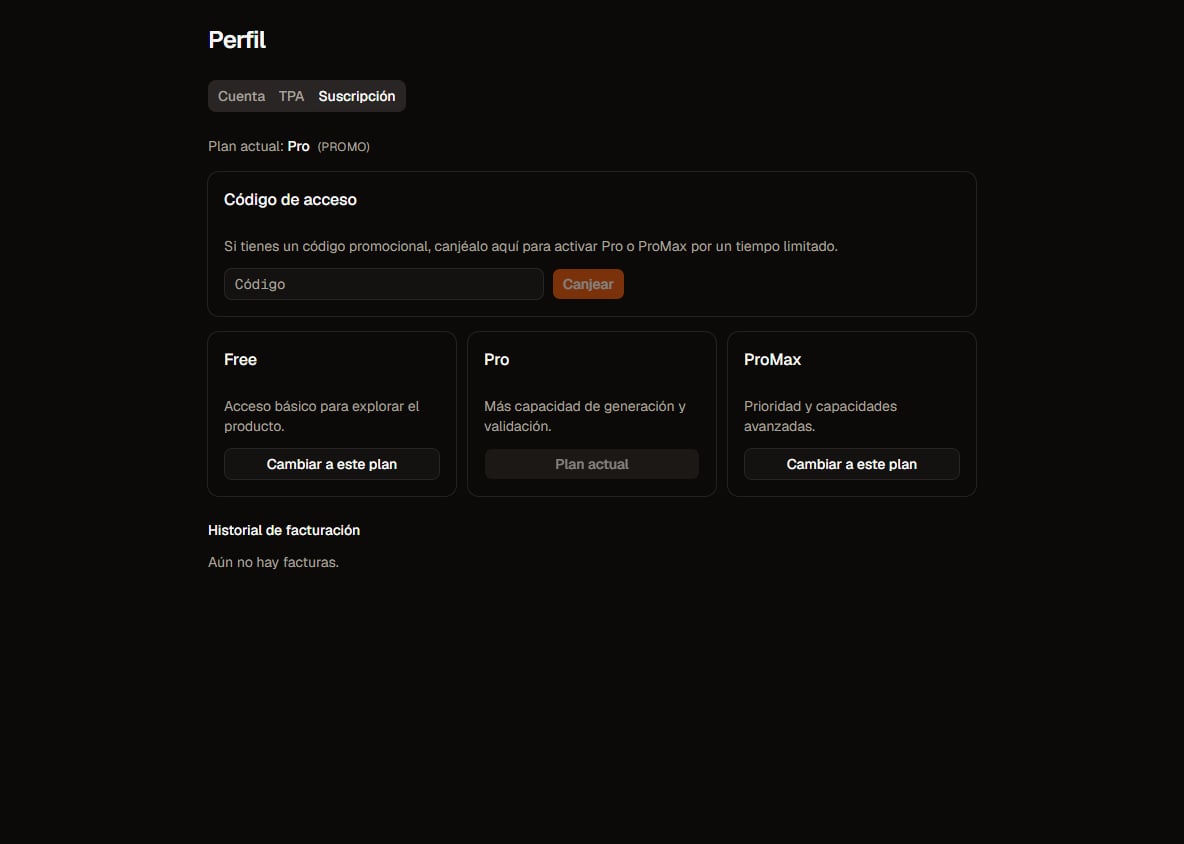
Under **Profile → subscription / plan**:
* Current plan
* **Switch to this plan** (upgrade/downgrade)
* **Manage billing** → Customer Portal (payment method, cancellation via Stripe)
* **Billing history** (invoices, PDF, pay/retry if open)
* **Access code** (promo redeem)
## Upgrade and downgrade
| Change | Plan effect |
| --------------------------------------------- | --------------------------------------------------------------------------------- |
| Free → Pro / ProMax | Hosted checkout; after successful charge the plan rises **immediately** (webhook) |
| Pro → ProMax (or other paid upgrade) | Subscription update with proration; higher plan **immediate** |
| Downgrade (e.g. ProMax → Pro, or paid → Free) | **Scheduled for period end**; you keep the current plan until then |
The UI shows copy like *Change scheduled for end of billing period* or *Subscription updated*.
## Portal and invoices
* **Manage billing** opens the processor portal (no PCI in Quanorix).
* **History** shows Paid / Open / Void / etc., plus **PDF** when available.
* Failed recurring charges: use **Pay / retry** or the portal.
## Promo access code (redeem)
If you have a code:
1. Profile → **Access code** → enter code → **Redeem**.
2. Activates Pro or ProMax for a **limited time** (`until `).
3. Typical errors: invalid, expired, no uses left, already redeemed, or **you already have an active paid subscription** (promo will not overwrite it).
We do not document admin code creation — only customer redeem.
## Common issues
* Checkout cancelled → plan unchanged; try again.
* Plan not reflecting payment instantly → wait a few seconds and reload.
* Portal won’t open → session / billing disabled in the environment.
* More: [Troubleshooting](/en/troubleshooting).
## Next
* [Account and authentication](/en/account/auth)
* [Quickstart](/en/getting-started/quickstart)
If Profile says payments are not enabled (`STRIPE_BILLING_ENABLED`), this environment is not taking charges; the rest of the app may still work.
## Plans (summary)
| Plan | Price (landing) | Focus |
| ---------- | --------------- | --------------------------------------------------------------------------- |
| **Free** | \$0/mo | Explore: basic generation, personal databank, limited export |
| **Pro** | \$29/mo | Mass generation, walk-forward/robustness, portfolios, full MQL export, jobs |
| **ProMax** | \$79/mo | Everything in Pro + regime, mixer, priority, priority support |
Exact feature blurbs may evolve on the landing/Profile; treat the UI as the source of what **your** account can do today.
## Where to manage it
Under **Profile → subscription / plan**:
* Current plan
* **Switch to this plan** (upgrade/downgrade)
* **Manage billing** → Customer Portal (payment method, cancellation via Stripe)
* **Billing history** (invoices, PDF, pay/retry if open)
* **Access code** (promo redeem)
## Upgrade and downgrade
| Change | Plan effect |
| --------------------------------------------- | --------------------------------------------------------------------------------- |
| Free → Pro / ProMax | Hosted checkout; after successful charge the plan rises **immediately** (webhook) |
| Pro → ProMax (or other paid upgrade) | Subscription update with proration; higher plan **immediate** |
| Downgrade (e.g. ProMax → Pro, or paid → Free) | **Scheduled for period end**; you keep the current plan until then |
The UI shows copy like *Change scheduled for end of billing period* or *Subscription updated*.
## Portal and invoices
* **Manage billing** opens the processor portal (no PCI in Quanorix).
* **History** shows Paid / Open / Void / etc., plus **PDF** when available.
* Failed recurring charges: use **Pay / retry** or the portal.
## Promo access code (redeem)
If you have a code:
1. Profile → **Access code** → enter code → **Redeem**.
2. Activates Pro or ProMax for a **limited time** (`until `).
3. Typical errors: invalid, expired, no uses left, already redeemed, or **you already have an active paid subscription** (promo will not overwrite it).
We do not document admin code creation — only customer redeem.
## Common issues
* Checkout cancelled → plan unchanged; try again.
* Plan not reflecting payment instantly → wait a few seconds and reload.
* Portal won’t open → session / billing disabled in the environment.
* More: [Troubleshooting](/en/troubleshooting).
## Next
* [Account and authentication](/en/account/auth)
* [Quickstart](/en/getting-started/quickstart)