> ## Documentation Index
> Fetch the complete documentation index at: https://docs.quanorix.com/llms.txt
> Use this file to discover all available pages before exploring further.
# Market data
> M1 downloads, subscriptions, update-all, and conversion-pair notices.
# Market data
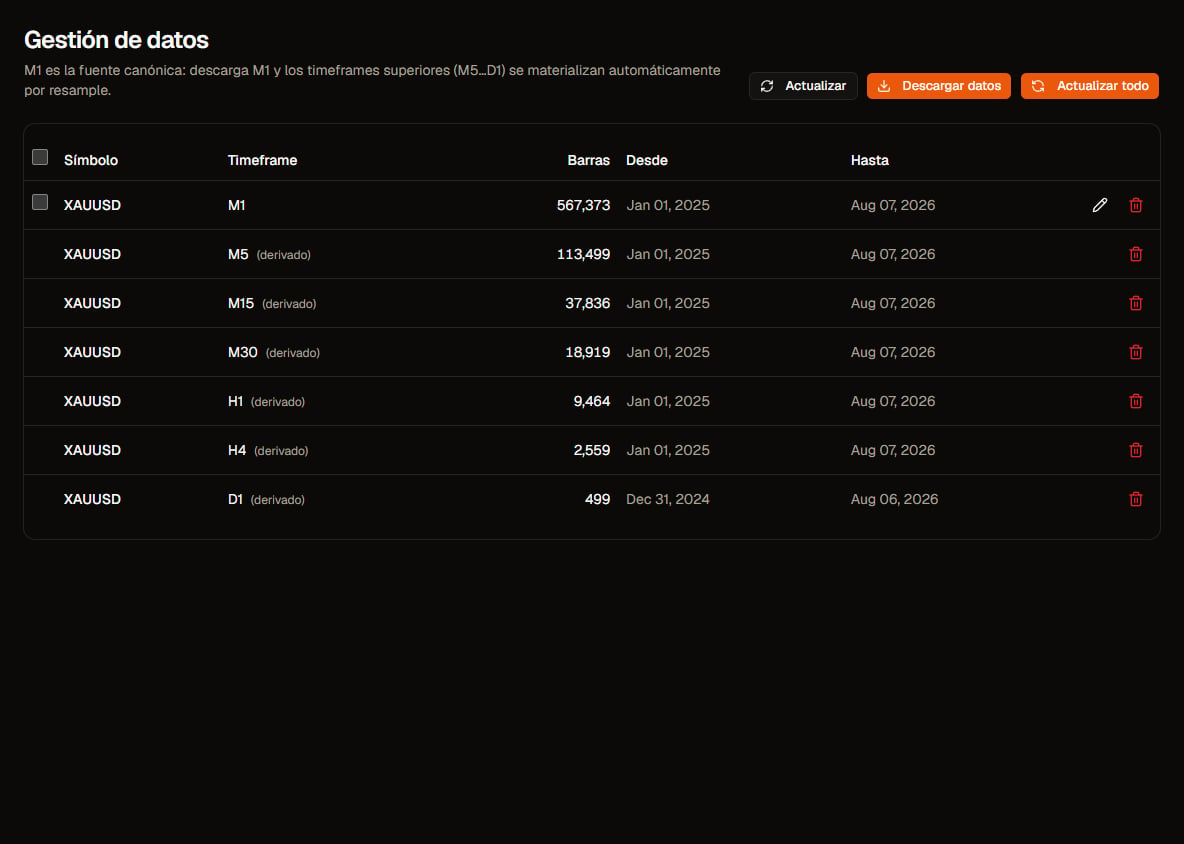
**Data** is where you download and maintain the series used by Generator, Validation, and the Databank. Canonical storage is **M1**; other timeframes are resampled when needed.
 ## Download a symbol
1. Open **Data**.
2. Pick catalog symbol, timeframe, and date range.
3. Click **Download** / start the download.
4. Track progress in the same view or in **Jobs**.
The first download of a long range can take a while. That is expected.
## Update
* **Update** on an existing symbol: extend or refresh M1 (update dialog).
* **Update all** / **Update selected**: batch-refresh your subscriptions. Confirm the dialog before continuing.
## Subscriptions
Downloading usually **subscribes** you to that symbol/timeframe so you can update later. You can **unsubscribe** in the UI when you no longer need it (this removes your active subscription; it does not necessarily delete shared product history).
Shared market series differ from **your** strategies/portfolios: series may be shared; the databank is personal.
## Conversion pairs (FX / USD PnL)
If a symbol needs a conversion pair for USD metrics/sizing, the UI may warn that you must download that pair for the **same range**. Without it, backtests may warn that metrics are not in USD.
## Relation to the TPA
Downloads here feed the cloud. When you run a compute job on the TPA, the agent syncs its [local M1 cache](/en/tpa/cache) from what is available. You need **both**: data in the app + an online TPA.
## Next
* [Trading Platform Agent](/en/tpa/overview)
* [Generator](/en/generator/overview) (when expanded) or [Quickstart](/en/getting-started/quickstart)
## Download a symbol
1. Open **Data**.
2. Pick catalog symbol, timeframe, and date range.
3. Click **Download** / start the download.
4. Track progress in the same view or in **Jobs**.
The first download of a long range can take a while. That is expected.
## Update
* **Update** on an existing symbol: extend or refresh M1 (update dialog).
* **Update all** / **Update selected**: batch-refresh your subscriptions. Confirm the dialog before continuing.
## Subscriptions
Downloading usually **subscribes** you to that symbol/timeframe so you can update later. You can **unsubscribe** in the UI when you no longer need it (this removes your active subscription; it does not necessarily delete shared product history).
Shared market series differ from **your** strategies/portfolios: series may be shared; the databank is personal.
## Conversion pairs (FX / USD PnL)
If a symbol needs a conversion pair for USD metrics/sizing, the UI may warn that you must download that pair for the **same range**. Without it, backtests may warn that metrics are not in USD.
## Relation to the TPA
Downloads here feed the cloud. When you run a compute job on the TPA, the agent syncs its [local M1 cache](/en/tpa/cache) from what is available. You need **both**: data in the app + an online TPA.
## Next
* [Trading Platform Agent](/en/tpa/overview)
* [Generator](/en/generator/overview) (when expanded) or [Quickstart](/en/getting-started/quickstart)