> ## Documentation Index
> Fetch the complete documentation index at: https://docs.quanorix.com/llms.txt
> Use this file to discover all available pages before exploring further.
# Strategy detail
> Backtest, costs, monthly analytics, evolve, reports, and bot export.
# Strategy detail
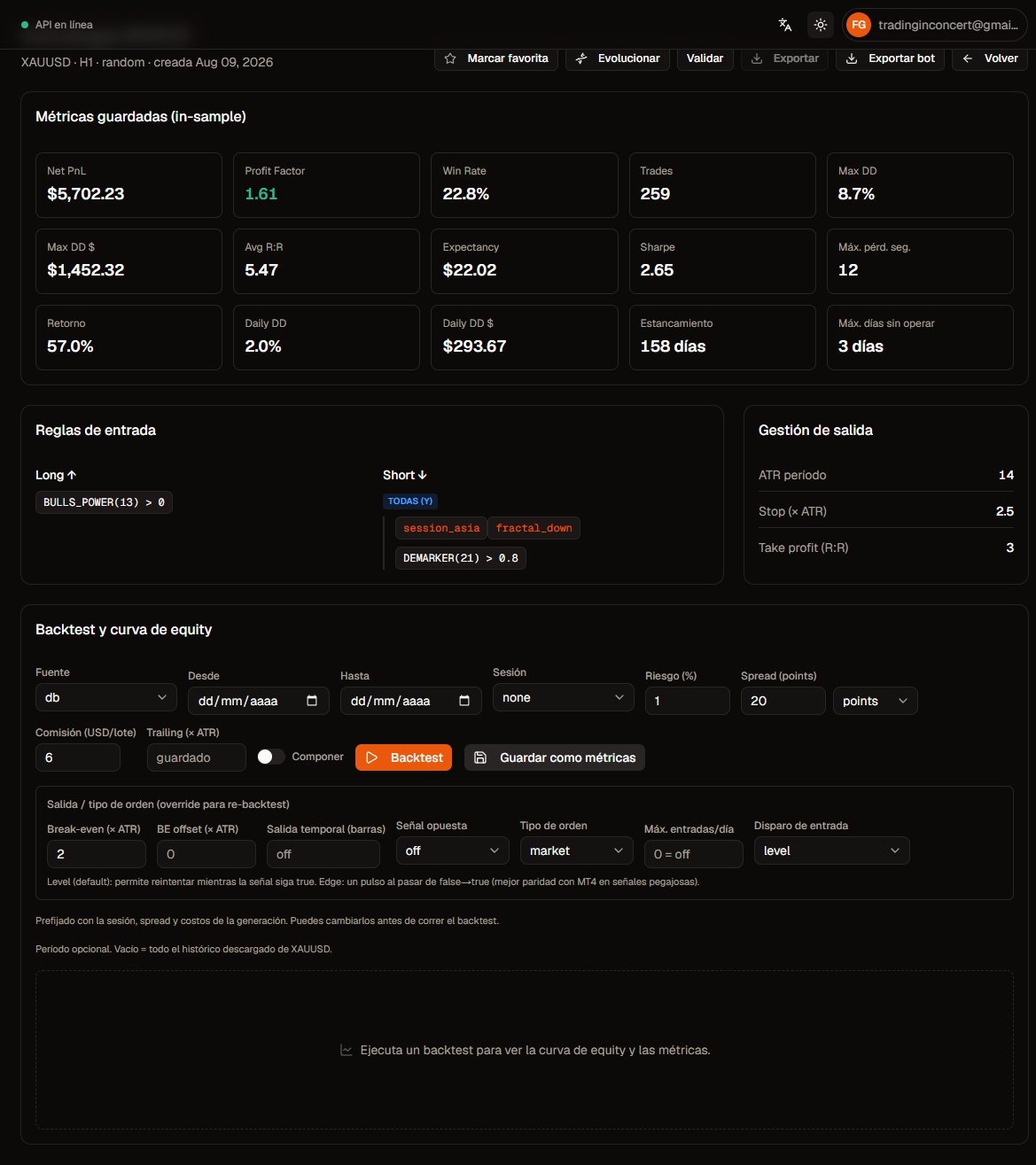
Open a Databank row to review rules, saved metrics, re-backtest with different costs, then validate, evolve, or export.
 ## What you see
* Meta: symbol, TF, source, created date.
* **IS metrics** (and OOS if generation used a holdout).
* **Entry rules** long/short and exit management (ATR stop, R:R, etc.).
## Backtest and equity curve
1. Adjust risk, spread, commission, session, dates, compounding, and exit/order overrides if needed.
2. Click **Backtest**.
3. Review the equity curve, trade summary, and warnings (lot clamped, missing conversion pair, etc.).
Values are **prefilled** from generation context; you can change them before running.
### Save as metrics
If you change costs and want the databank’s **persisted** metrics to match:
1. **Save as metrics** → confirm the dialog.
2. Quanorix re-backtests and replaces IS metrics (and clears prior OOS if that flow has no OOS fraction).
The UI warns when on-screen costs differ from saved metrics.
## Monthly analytics
After a backtest you get **Monthly analytics** (PnL / % by month) and the month×year returns table when data exists — useful seasonality check before adding the strategy to a portfolio.
## Evolve (genetics from the parent)
## What you see
* Meta: symbol, TF, source, created date.
* **IS metrics** (and OOS if generation used a holdout).
* **Entry rules** long/short and exit management (ATR stop, R:R, etc.).
## Backtest and equity curve
1. Adjust risk, spread, commission, session, dates, compounding, and exit/order overrides if needed.
2. Click **Backtest**.
3. Review the equity curve, trade summary, and warnings (lot clamped, missing conversion pair, etc.).
Values are **prefilled** from generation context; you can change them before running.
### Save as metrics
If you change costs and want the databank’s **persisted** metrics to match:
1. **Save as metrics** → confirm the dialog.
2. Quanorix re-backtests and replaces IS metrics (and clears prior OOS if that flow has no OOS fraction).
The UI warns when on-screen costs differ from saved metrics.
## Monthly analytics
After a backtest you get **Monthly analytics** (PnL / % by month) and the month×year returns table when data exists — useful seasonality check before adding the strategy to a portfolio.
## Evolve (genetics from the parent)
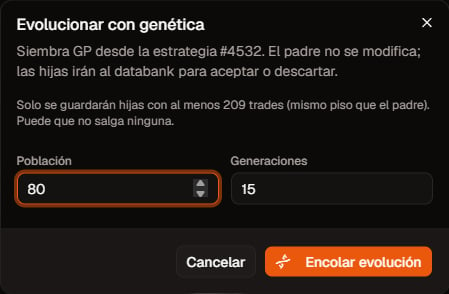 1. **Evolve** → dialog for GP seeded from this strategy.
2. The **parent is not modified**; children appear as new strategies (with the parent’s min-trades floor).
3. Follow the job in **Jobs**; then filter **Evolved only** in the Databank.
## Reports
From on-screen results you can export **HTML** / **Excel** reports (when the UI offers them on detail, validation, or portfolio). They include metrics and, depending on the report, stagnation / flat days.
## Export bot
[Export MT4/MT5 bots](/en/export/mt4-mt5) — block coverage, EA inputs, and broker aliases.
## Validate
Deep-link / button into **Validation** (walk-forward, robustness, regime) with the strategy preselected. Details in the Validation section.
## Common warnings
| Warning | What to do |
| ------------------------- | ------------------------------------------------------ |
| Missing conversion pair | Download the pair in Data (same range) and re-backtest |
| Lot clamped min/max | Raise capital/risk or check instrument limits |
| Costs outdated vs metrics | Use **Save as metrics** if you want to persist |
## Next
* [Databank](/en/databank/overview)
* [Sessions and timezones](/en/settings/sessions-timezones)
* [Validation](/en/validation/overview)
1. **Evolve** → dialog for GP seeded from this strategy.
2. The **parent is not modified**; children appear as new strategies (with the parent’s min-trades floor).
3. Follow the job in **Jobs**; then filter **Evolved only** in the Databank.
## Reports
From on-screen results you can export **HTML** / **Excel** reports (when the UI offers them on detail, validation, or portfolio). They include metrics and, depending on the report, stagnation / flat days.
## Export bot
[Export MT4/MT5 bots](/en/export/mt4-mt5) — block coverage, EA inputs, and broker aliases.
## Validate
Deep-link / button into **Validation** (walk-forward, robustness, regime) with the strategy preselected. Details in the Validation section.
## Common warnings
| Warning | What to do |
| ------------------------- | ------------------------------------------------------ |
| Missing conversion pair | Download the pair in Data (same range) and re-backtest |
| Lot clamped min/max | Raise capital/risk or check instrument limits |
| Costs outdated vs metrics | Use **Save as metrics** if you want to persist |
## Next
* [Databank](/en/databank/overview)
* [Sessions and timezones](/en/settings/sessions-timezones)
* [Validation](/en/validation/overview)