> ## Documentation Index
> Fetch the complete documentation index at: https://docs.quanorix.com/llms.txt
> Use this file to discover all available pages before exploring further.
# Dashboard
> Home overview: jobs, agent, quotas, favorites, and portfolios.
# Dashboard
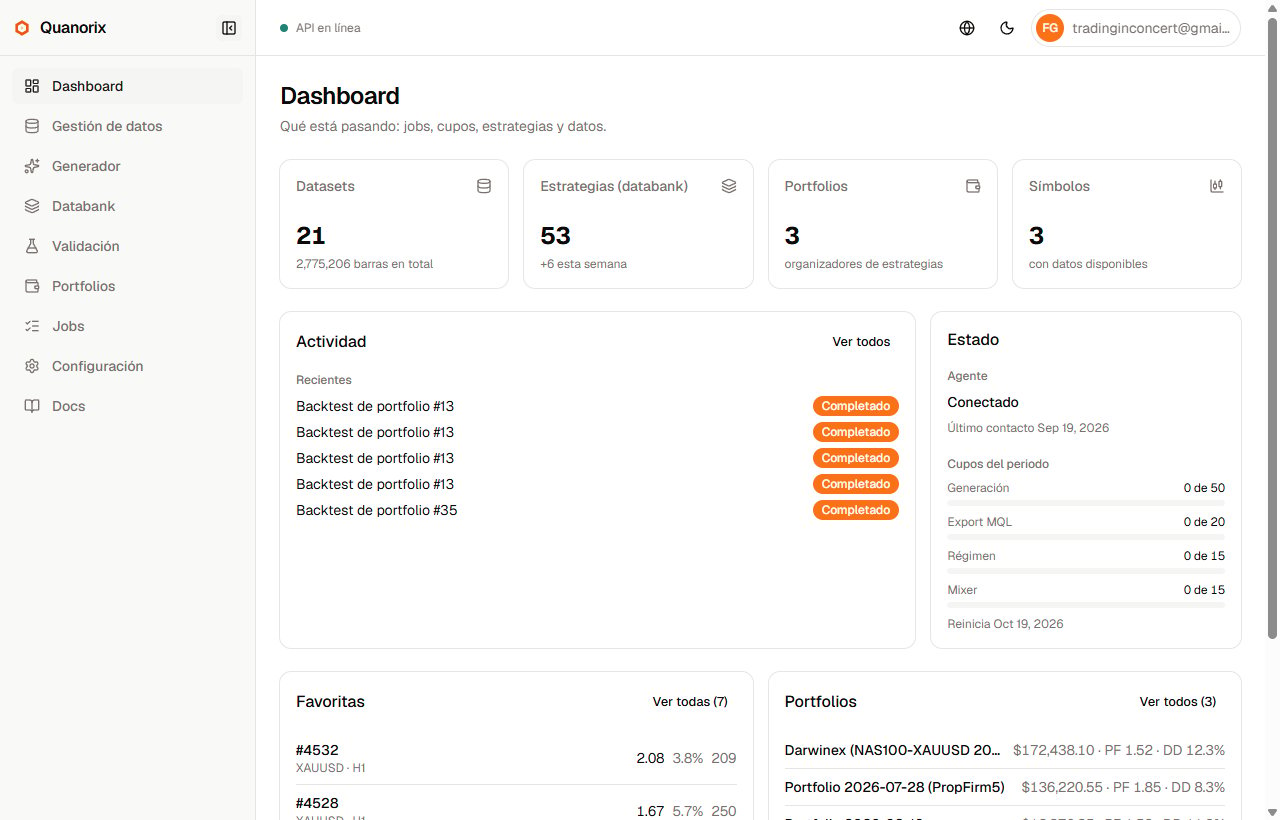
The **Dashboard** is the authenticated app home. It summarizes what is happening now (jobs, TPA, quotas) and shortcuts to what usually matters: favorites, top by PF, and highlighted portfolios.
 ## What you see
| Block | Content |
| - | - |
| **Activity** | Running and recent jobs, with a link to [Jobs](/en/jobs/overview) |
| **Status** | TPA agent (connected / linked offline / not linked) and **period quotas** (generate, export, regime, mixer) |
| **Strategies** | Favorites and top by profit factor, linking to the [Databank](/en/databank/overview) |
| **Portfolios** | Highlights (including favorites) with last-backtest metrics |
| **Onboarding** | Short checklist when steps are still missing (data, TPA, first generation) |
Dataset / strategy / portfolio / symbol counts give quick context; the focus is activity and status, not a static panel.
## When to use it
* On open: is a job running? Is the TPA online? Any quota left?
* Jump to a favorite or portfolio without digging through filters.
## Next
* [Quickstart](/en/getting-started/quickstart)
* [Jobs](/en/jobs/overview)
* [Trading Platform Agent](/en/tpa/overview)
This documentation is built and hosted on [Mintlify](https://mintlify.com), a developer documentation platform.
## What you see
| Block | Content |
| - | - |
| **Activity** | Running and recent jobs, with a link to [Jobs](/en/jobs/overview) |
| **Status** | TPA agent (connected / linked offline / not linked) and **period quotas** (generate, export, regime, mixer) |
| **Strategies** | Favorites and top by profit factor, linking to the [Databank](/en/databank/overview) |
| **Portfolios** | Highlights (including favorites) with last-backtest metrics |
| **Onboarding** | Short checklist when steps are still missing (data, TPA, first generation) |
Dataset / strategy / portfolio / symbol counts give quick context; the focus is activity and status, not a static panel.
## When to use it
* On open: is a job running? Is the TPA online? Any quota left?
* Jump to a favorite or portfolio without digging through filters.
## Next
* [Quickstart](/en/getting-started/quickstart)
* [Jobs](/en/jobs/overview)
* [Trading Platform Agent](/en/tpa/overview)
This documentation is built and hosted on [Mintlify](https://mintlify.com), a developer documentation platform.