> ## Documentation Index
> Fetch the complete documentation index at: https://docs.quanorix.com/llms.txt
> Use this file to discover all available pages before exploring further.
# Prop firm simulation
> Simulate Axi Select or PropFirm on the portfolio’s latest backtest: parameters, results, and limits.
# Prop firm simulation
On a **portfolio detail** page, after a backtest with trades, **Simulate** evaluates that track record against challenge rules (**Axi Select** or **PropFirm**). It does not consume plan quota and does not replace the firm’s platform or guarantee passing an evaluation.
Quanorix is a research tool. The simulation uses public rules or the ones you configure; it is not Axi (or any other prop firm), and the real Edge Score is not computed here.
 ## When to use it
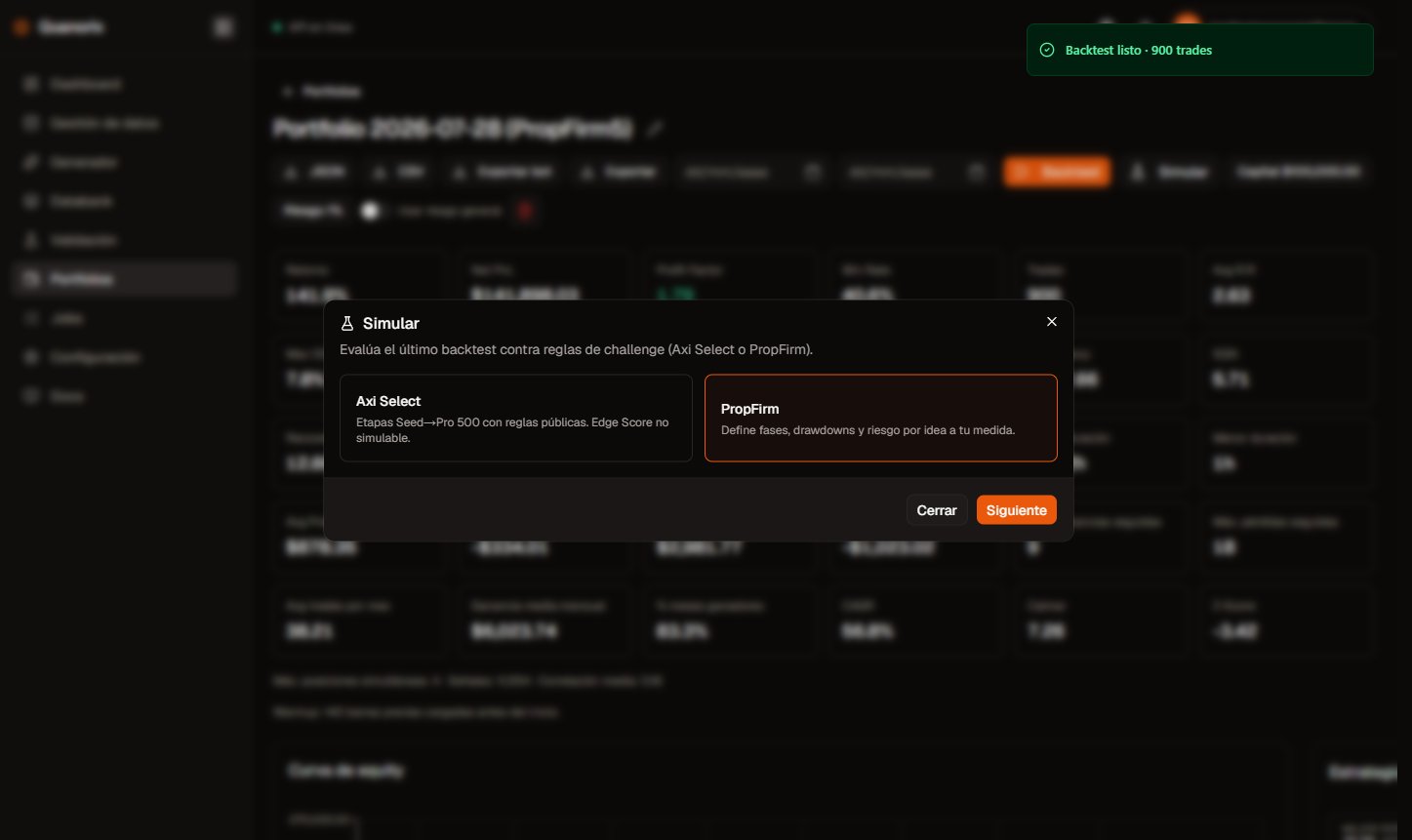
1. Open the portfolio and run a **Backtest** (optional date range).
2. When there is a result with trades, click **Simulate** (next to Backtest). Without a recent backtest on that screen, the button asks you to run one first — same gate as exporting the report.
3. Choose **Axi Select** or **PropFirm**, configure if needed, and review results.
4. Optional: download the report as **Markdown** (`.md`) or **Excel** (`.xlsx`).
## Flow
```
Backtest → Simulate → Preset (Axi / PropFirm) → Configuration → Results → .md / .xlsx
```
## Axi Select
Preset with the public stages Seed → Incubation → Acceleration → Pro → Pro 500 → **Pro M**. The modal table is read-only.
## When to use it
1. Open the portfolio and run a **Backtest** (optional date range).
2. When there is a result with trades, click **Simulate** (next to Backtest). Without a recent backtest on that screen, the button asks you to run one first — same gate as exporting the report.
3. Choose **Axi Select** or **PropFirm**, configure if needed, and review results.
4. Optional: download the report as **Markdown** (`.md`) or **Excel** (`.xlsx`).
## Flow
```
Backtest → Simulate → Preset (Axi / PropFirm) → Configuration → Results → .md / .xlsx
```
## Axi Select
Preset with the public stages Seed → Incubation → Acceleration → Pro → Pro 500 → **Pro M**. The modal table is read-only.
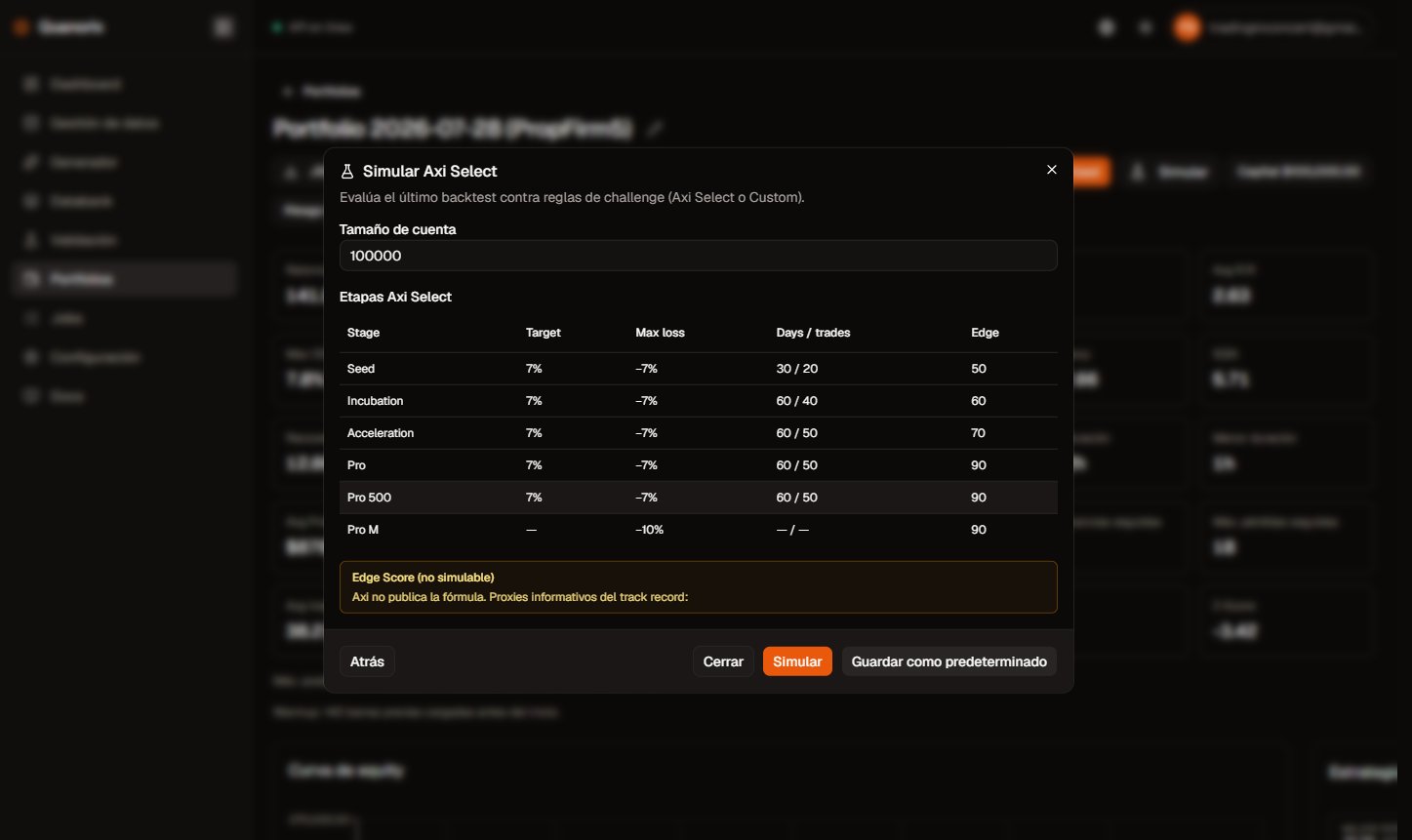 | Column / concept | Meaning |
| - | - |
| **Allocated capital** | Published cap per stage (e.g. Seed \$5k … Pro M \$1M). Simulated payout uses that cap; live allocation may be lower depending on Edge Score. |
| **Profit share** | Share of the month’s profit paid to you (0 / 40 / 50 / 60 / 70; Pro M 80). |
| **Min Edge Score** | Published threshold to advance; **informational**. Quanorix does not invent an Edge Score number. |
| **Min equity** | Stage minimum equity from public rules. |
| **Target %** | Profit target per challenge stage (typically 7%). Pro M has no challenge target. |
| **Calendar days / min trades** | Per-stage minima before you can pass. |
| **Max loss %** | 7% in challenge stages; 10% in Pro M. Static drawdown on equity. |
Other Axi notes:
* If a stage requires a flat account at the cut, the simulator applies it.
* Real Axi **quarantine** in mid-stages is **not** modeled: a breach returns to Seed (stricter than the firm).
* The **Checklist** tab appears only for Axi (program rules vs guidance profile items).
* The **Edge Score** tab shows **proxies** from the track record (e.g. return/DD, positive streak); not an official score.
## PropFirm — parameter glossary
Define a 1–3 phase challenge and funded-account rules to match your firm.
| Column / concept | Meaning |
| - | - |
| **Allocated capital** | Published cap per stage (e.g. Seed \$5k … Pro M \$1M). Simulated payout uses that cap; live allocation may be lower depending on Edge Score. |
| **Profit share** | Share of the month’s profit paid to you (0 / 40 / 50 / 60 / 70; Pro M 80). |
| **Min Edge Score** | Published threshold to advance; **informational**. Quanorix does not invent an Edge Score number. |
| **Min equity** | Stage minimum equity from public rules. |
| **Target %** | Profit target per challenge stage (typically 7%). Pro M has no challenge target. |
| **Calendar days / min trades** | Per-stage minima before you can pass. |
| **Max loss %** | 7% in challenge stages; 10% in Pro M. Static drawdown on equity. |
Other Axi notes:
* If a stage requires a flat account at the cut, the simulator applies it.
* Real Axi **quarantine** in mid-stages is **not** modeled: a breach returns to Seed (stricter than the firm).
* The **Checklist** tab appears only for Axi (program rules vs guidance profile items).
* The **Edge Score** tab shows **proxies** from the track record (e.g. return/DD, positive streak); not an official score.
## PropFirm — parameter glossary
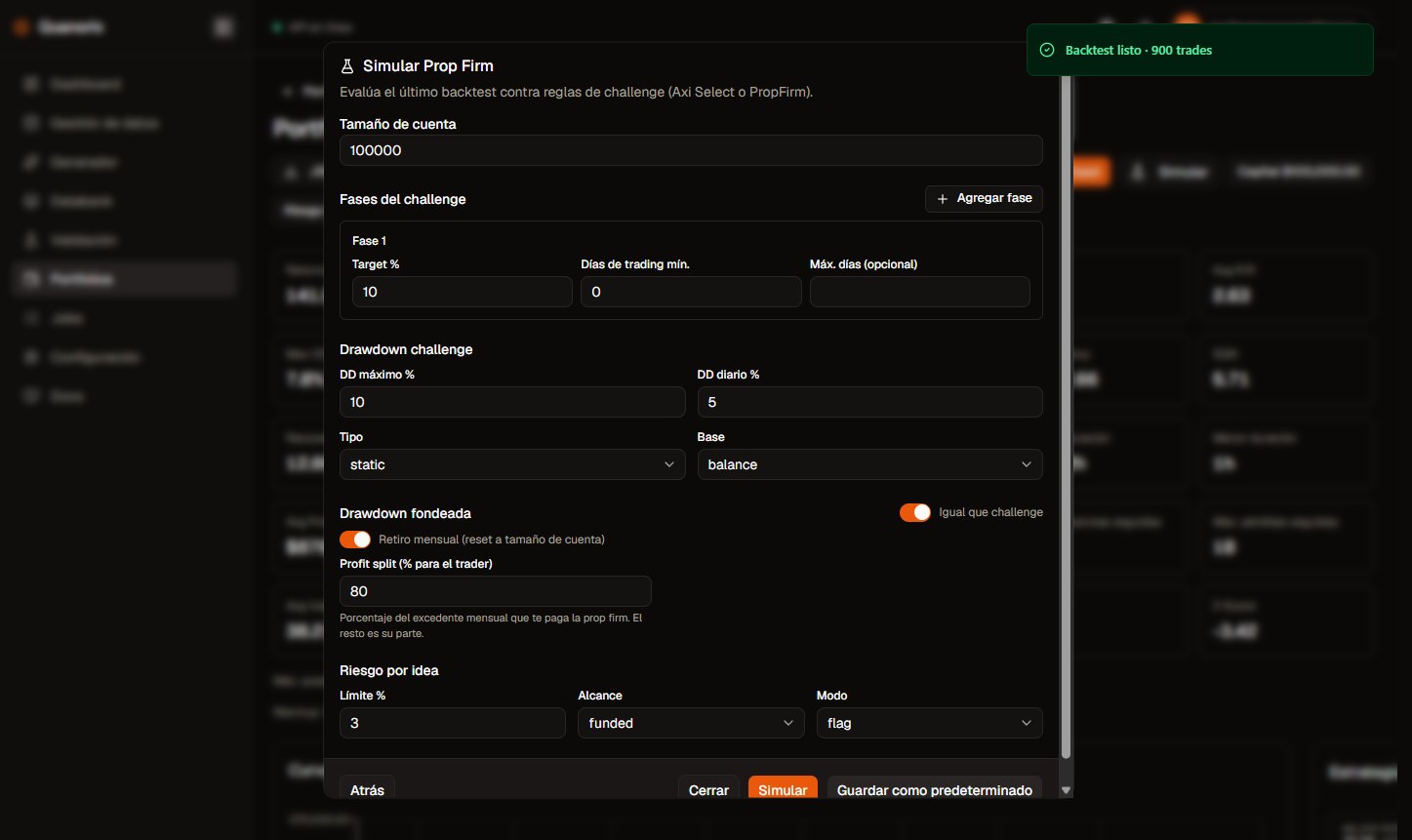
Define a 1–3 phase challenge and funded-account rules to match your firm.
 ### Account size
Reference capital for the simulation. Backtest PnL and equity are **rescaled** to this size relative to portfolio capital. Use it to try a \$10k challenge even if the backtest used a different capital.
### Challenge phases
* **Target %** — cumulative profit needed to pass the phase. Leave phase 2 empty for a **single-phase** challenge.
* **Min trading days** — days with **at least one trade**, not calendar days.
* **Max days** (optional) — calendar ceiling to finish the phase; running out without passing → account lost.
* **Add phase** — up to 3 sequential phases.
### Drawdown (challenge vs funded)
Two independent blocks: rules **during the challenge** and rules **once funded**. Use “same as challenge” to copy.
* **Max DD %** — maximum allowed drop. Empty = that limit is off.
* **Daily DD %** — maximum drop in one day. Empty = off.
* **Static type** — measured from a fixed level (e.g. day start or account level), not a moving peak.
* **Trailing type** — measured from the **peak** equity reached (high-water mark).
* **Equity basis** — includes open-position floating PnL. The on-screen curve is an **approximation**.
* **Balance basis** — closed trades only; closed balance is **exact**.
Any breach (daily DD, max DD, max days, or idea risk in fail mode) marks an **account loss** with date and phase, and the next attempt restarts at **phase 1**.
### Monthly withdrawal and profit split
In funded mode, each calendar month starts at account size. At month end the **gross excess** leaves the account (reset) and the next month starts again at that size.
* **Profit split (% to trader)** — of that excess, only your share counts as “Withdrawn” / payout. The rest is the firm’s share. The account reset uses the full **gross** excess.
### Idea risk
Sums effective risk of trades **open at the same time** on the same symbol and side (e.g. two overlapping NAS100 longs).
* **Limit %** — threshold vs account size. `0` = off.
* **Scope** — funded only, or the full lifecycle (challenge + funded).
* **Flag mode** — records the violation without failing the account.
* **Fail mode** — account lost.
### Save as Default
Stores the PropFirm form (or Axi account size) in **this browser** for your user. It does not travel to another device or sync to the cloud account.
## Results
### Account size
Reference capital for the simulation. Backtest PnL and equity are **rescaled** to this size relative to portfolio capital. Use it to try a \$10k challenge even if the backtest used a different capital.
### Challenge phases
* **Target %** — cumulative profit needed to pass the phase. Leave phase 2 empty for a **single-phase** challenge.
* **Min trading days** — days with **at least one trade**, not calendar days.
* **Max days** (optional) — calendar ceiling to finish the phase; running out without passing → account lost.
* **Add phase** — up to 3 sequential phases.
### Drawdown (challenge vs funded)
Two independent blocks: rules **during the challenge** and rules **once funded**. Use “same as challenge” to copy.
* **Max DD %** — maximum allowed drop. Empty = that limit is off.
* **Daily DD %** — maximum drop in one day. Empty = off.
* **Static type** — measured from a fixed level (e.g. day start or account level), not a moving peak.
* **Trailing type** — measured from the **peak** equity reached (high-water mark).
* **Equity basis** — includes open-position floating PnL. The on-screen curve is an **approximation**.
* **Balance basis** — closed trades only; closed balance is **exact**.
Any breach (daily DD, max DD, max days, or idea risk in fail mode) marks an **account loss** with date and phase, and the next attempt restarts at **phase 1**.
### Monthly withdrawal and profit split
In funded mode, each calendar month starts at account size. At month end the **gross excess** leaves the account (reset) and the next month starts again at that size.
* **Profit split (% to trader)** — of that excess, only your share counts as “Withdrawn” / payout. The rest is the firm’s share. The account reset uses the full **gross** excess.
### Idea risk
Sums effective risk of trades **open at the same time** on the same symbol and side (e.g. two overlapping NAS100 longs).
* **Limit %** — threshold vs account size. `0` = off.
* **Scope** — funded only, or the full lifecycle (challenge + funded).
* **Flag mode** — records the violation without failing the account.
* **Fail mode** — account lost.
### Save as Default
Stores the PropFirm form (or Axi account size) in **this browser** for your user. It does not travel to another device or sync to the cloud account.
## Results
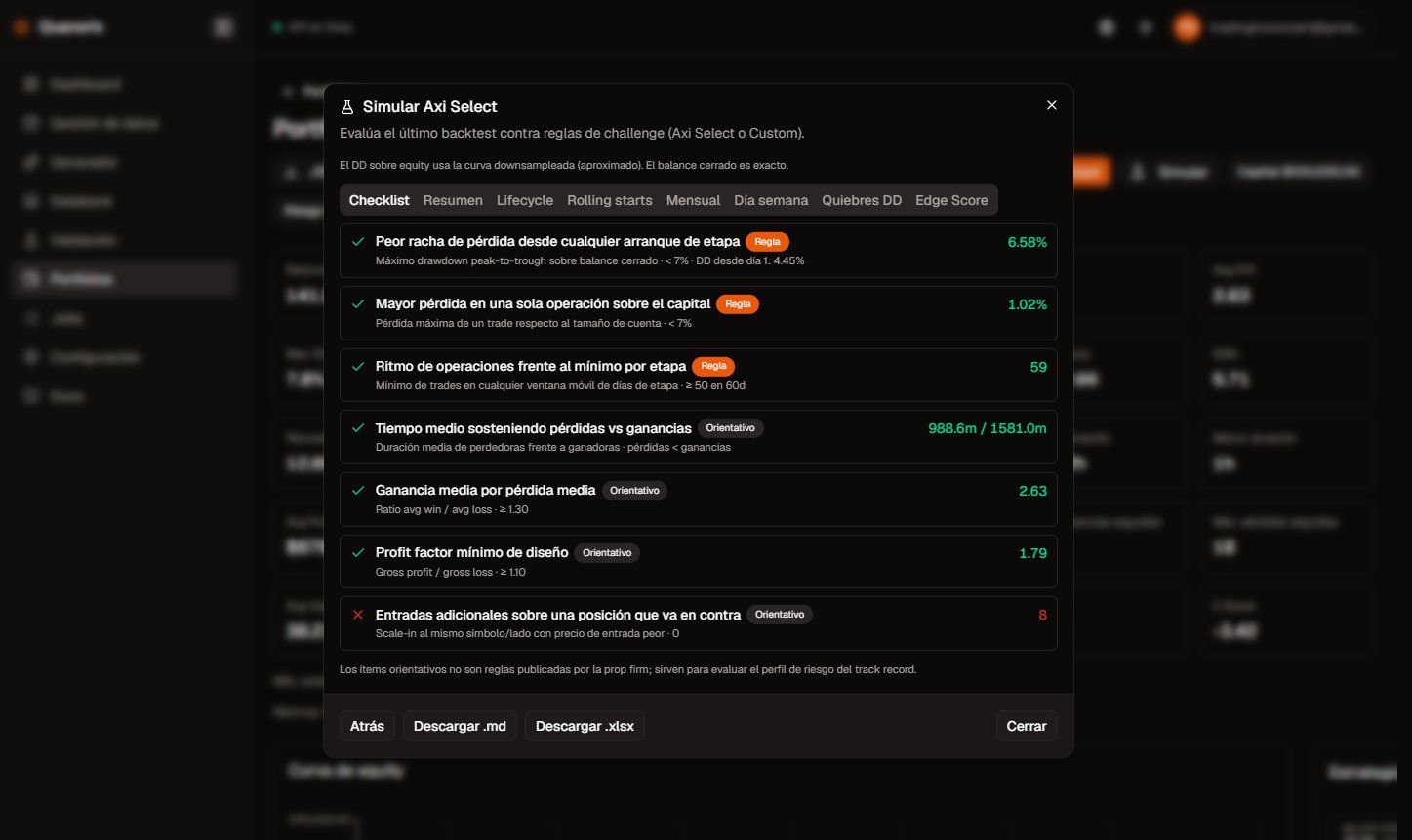 | Tab | What you see |
| - | - |
| **Summary** | Attempts, challenges passed, accounts lost, rolling rate (decided starts only), prop-style metrics |
| **Lifecycle** | Timeline from the first trade: phase passes, funded entry, breaches and restarts |
| **Rolling starts** | Each row is an **independent** simulation starting on day 1 of that month (not one evolving account). “Unfinished” = history ended without breach or completing stages; **not** a failure. Pass rate only counts decided starts |
| **Monthly** | Funded months: profit, withdrawn (your split), firm share, month DD. On Axi, figures rescale to the active stage’s capital |
| **Weekday** | Cumulative drawdown by weekday |
| **Violations** | Idea-risk events |
| **DD breaches** | Account losses from drawdown (date, phase, reason) |
| **Checklist** | Axi only: pass/fail for program rules vs guidance profile items |
| **Edge Score** | Axi only: informational proxies |
## Honest limits
* The on-screen equity curve is an **approximation** of floating PnL; closed-trade balance is exact.
* The simulator does **not** use each trade’s lot size for lot exposure.
* Short histories → few rolling-start rows; check the `n` count.
* Research only: it does not replace the firm’s official rules or Edge Score.
## Next
* [Portfolios](/en/portfolios/overview)
* [Export bots](/en/export/mt4-mt5)
* [MCP and API keys](/en/account/mcp)
This documentation is built and hosted on [Mintlify](https://mintlify.com), a developer documentation platform.
| Tab | What you see |
| - | - |
| **Summary** | Attempts, challenges passed, accounts lost, rolling rate (decided starts only), prop-style metrics |
| **Lifecycle** | Timeline from the first trade: phase passes, funded entry, breaches and restarts |
| **Rolling starts** | Each row is an **independent** simulation starting on day 1 of that month (not one evolving account). “Unfinished” = history ended without breach or completing stages; **not** a failure. Pass rate only counts decided starts |
| **Monthly** | Funded months: profit, withdrawn (your split), firm share, month DD. On Axi, figures rescale to the active stage’s capital |
| **Weekday** | Cumulative drawdown by weekday |
| **Violations** | Idea-risk events |
| **DD breaches** | Account losses from drawdown (date, phase, reason) |
| **Checklist** | Axi only: pass/fail for program rules vs guidance profile items |
| **Edge Score** | Axi only: informational proxies |
## Honest limits
* The on-screen equity curve is an **approximation** of floating PnL; closed-trade balance is exact.
* The simulator does **not** use each trade’s lot size for lot exposure.
* Short histories → few rolling-start rows; check the `n` count.
* Research only: it does not replace the firm’s official rules or Edge Score.
## Next
* [Portfolios](/en/portfolios/overview)
* [Export bots](/en/export/mt4-mt5)
* [MCP and API keys](/en/account/mcp)
This documentation is built and hosted on [Mintlify](https://mintlify.com), a developer documentation platform.