> ## Documentation Index
> Fetch the complete documentation index at: https://docs.quanorix.com/llms.txt
> Use this file to discover all available pages before exploring further.
# Data cache
> First M1 sync on the TPA, later deltas, and practical tips.
# Data cache
The TPA keeps a local **M1 bar cache** on disk for symbols/ranges requested by compute jobs, so it does not re-download full history every run.
## First sync
* The **first** time a job needs a wide range, the agent downloads a full M1 pack. It can take a **long** time (minutes to hours depending on symbol, range, and network).
* Seeing the TPA in **running** (blue icon) during sync or generation is expected.
* Avoid quitting the TPA mid-sync if you can.
## Later updates (deltas)
When the requested range is already covered, the agent reuses local data and only fetches **tail deltas** when it needs to extend the end. That is usually much faster than the first load.
## Good practices
1. Download the symbol first in **Data** (cloud) for the range you will use.
2. Start Generator IS ranges reasonably — avoid decades “just in case.”
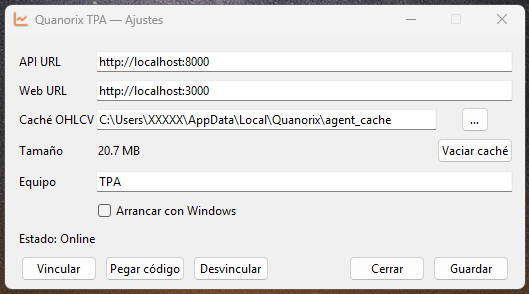
3. Leave disk space for the TPA cache folder (configurable in agent **Settings**).
4. If the cache is corrupt or you need space, use **Clear cache** / **Vaciar caché** in Settings, then sync again.
 ## Relation to the web app
**Data** downloads feed the product store. The **TPA cache** is a working copy on your PC for fast evaluation. Typical flow needs both: cloud data + online agent with a ready cache.
## Common issues
* Endless or failed sync → network, API, or range too large; shrink dates and retry.
* Job fails asking for data → confirm Data download and relaunch with TPA online.
* See [Troubleshooting](/en/troubleshooting).
## Relation to the web app
**Data** downloads feed the product store. The **TPA cache** is a working copy on your PC for fast evaluation. Typical flow needs both: cloud data + online agent with a ready cache.
## Common issues
* Endless or failed sync → network, API, or range too large; shrink dates and retry.
* Job fails asking for data → confirm Data download and relaunch with TPA online.
* See [Troubleshooting](/en/troubleshooting).