

Market data
Data is where you download and maintain the series used by Generator, Validation, and the Databank. Canonical storage is M1; other timeframes are resampled when needed.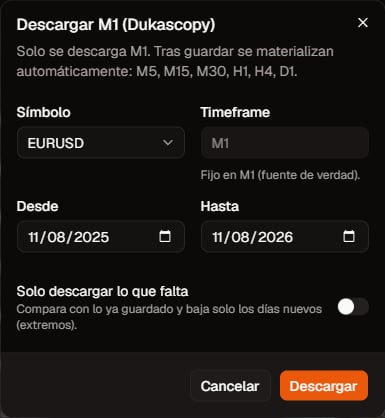
Data management. Click to zoom.
Download a symbol
- Open Data.
- Pick catalog symbol, timeframe, and date range.
- Click Download. The download runs as a background job on the server worker (it does not block the API).
- Track progress in the same view or in Jobs.
History limits by plan
The range is clipped to your plan cap and the instrument’s earliest M1 date. This is not a monthly counter: it is how many years you can request in one download (to − from).
The download dialog shows presets that fit your plan and a footer with the cap. Generate and validation only see your subscription, not canonical M1 another user already downloaded. Full table: Plans and billing.
Update
- Update on an existing symbol: extend or refresh M1 (update dialog).
- Update all / Update selected: batch-refresh your subscriptions. Confirm the dialog before continuing.
Subscriptions
Downloading usually subscribes you to that symbol/timeframe so you can update later. You can unsubscribe in the UI when you no longer need it.Conversion pairs (FX / USD PnL)
If a symbol needs a conversion pair for USD metrics/sizing, the UI may warn that you must download that pair for the same range. Without it, backtests may warn that metrics are not in USD.Relation to the TPA
Downloads here feed the cloud. When you run a compute job on the TPA, the agent syncs its local M1 cache from what is available. You need both: data in the app + an online TPA.Next
- Trading Platform Agent
- Generator (when expanded) or Quickstart