

Export MT4 / MT5 bots
From a strategy detail or portfolio page you can export a MetaTrader Expert Advisor (EA).Plan requirements
See quotas under Plans and billing. Only successful downloads count.
Individual strategy
- Open the strategy in the Databank.
- Export bot → choose
MT4orMT5. - Review the block coverage report.
- Download the
.mq4/.mq5.
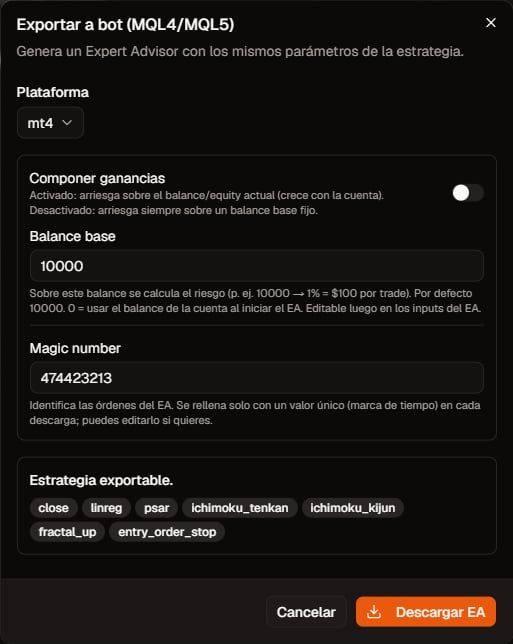
Export to bot dialog. Click to zoom.
inputs (sizing, ATR SL/TP/trail, magic, session, GMT offset, etc.) so you can calibrate in the terminal without rewriting logic.
Portfolio
From strategy detail you download a bot for that single strategy. From a portfolio you download the set of strategies added to that portfolio (the mix you backtest together).
Broker aliases are set under Settings → Instruments (or in the export dialog). See Broker symbol names.
Broker symbol names
Quanorix uses canonical names (e.g.NAS100, XAUUSD). Your broker may show a different Market Watch ticker (USTECH, USTEC, NASUSD, …). How that affects the bot:
Several strategies on the same asset
That is normal portfolio packaging, not a bug. Distinct magics isolate orders in the terminal. Operational caveat (not an export bug): more exposure if they open together; on MT5 netting accounts the broker nets the symbol into one position (no independent long+short); hedging allows multiple.Nasdaq example
- Portfolio with 2–3 strategies on
NAS100. - Export MT4, open the
USTECHchart (or your broker’s Nasdaq), attach that symbol’s.mq4→ it trades that chart. - Export MT5 with no alias → the bot looks for
NAS100. If Market Watch only hasUSTECH, set aliasNAS100→USTECHand re-export.
Block coverage
- Supported blocks: exportable with expected parity.
- Blocking unsupported blocks: UI/API prevents generating an incomplete EA by default.
- Some blocks may export with an approximate warning — read the reason before live trading.
Inputs you should know
Realistic expectations
- MT4 pending lists can show more states than the app (the app lists executed fills).
- Excel reports use raw UTC; HTML uses
display_tz. - Parity depends on aligned history, GMT offset, and costs (spread/commission).
Pre-live checklist
- Same history/TZ mental model as the backtest (or calibrated offset).
- Coverage without surprises.
- Correct broker aliases when needed (especially MT5 portfolio).
- Test in Strategy Tester with the same
InpBrokerGmtOffsetyou will use live (or document the difference).